<?xml version="1.0" encoding="utf-8"?><feed xmlns="http://www.w3.org/2005/Atom" ><generator uri="https://jekyllrb.com/" version="3.10.0">Jekyll</generator><link href="https://www.fabiocannas.com/feed.xml" rel="self" type="application/atom+xml" /><link href="https://www.fabiocannas.com/" rel="alternate" type="text/html" /><updated>2026-02-18T10:36:48+00:00</updated><id>https://www.fabiocannas.com/feed.xml</id><title type="html">Among the clouds</title><subtitle>Microsoft Azure Cloud engineering, automation, DevOps and more…</subtitle><author><name>Fabio Cannas</name></author><entry><title type="html">[VIDEO] Azure Meetup Veneto - Fabio Cannas - From migration to modernization, discover Azure Database Migration Service</title><link href="https://www.fabiocannas.com/2026/01/30/fabio-cannas-azure-meetup-veneto-from-migration-to-modernization-discover-azure-database-migration-service/" rel="alternate" type="text/html" title="[VIDEO] Azure Meetup Veneto - Fabio Cannas - From migration to modernization, discover Azure Database Migration Service" /><published>2026-01-30T00:00:00+00:00</published><updated>2026-01-30T00:00:00+00:00</updated><id>https://www.fabiocannas.com/2026/01/30/fabio-cannas-azure-meetup-veneto-from-migration-to-modernization-discover-azure-database-migration-service</id><content type="html" xml:base="https://www.fabiocannas.com/2026/01/30/fabio-cannas-azure-meetup-veneto-from-migration-to-modernization-discover-azure-database-migration-service/"><![CDATA[<!-- Courtesy of embedresponsively.com -->

<div class="responsive-video-container">
    <iframe src="https://www.youtube-nocookie.com/embed/eB4i0fDy5PE" frameborder="0" webkitallowfullscreen="" mozallowfullscreen="" allowfullscreen=""></iframe>
  </div>

<p>Whether you’re planning your first cloud migration or looking to evolve an already migrated infrastructure, this session will provide you with insights to transform migration into an opportunity for innovation.</p>]]></content><author><name>Fabio Cannas</name></author><category term="[&quot;Meetup&quot;, &quot;Community&quot;]" /><category term="Meetup" /><category term="Community" /><summary type="html"><![CDATA[Whether you're planning your first cloud migration or looking to evolve an already migrated infrastructure, this session will provide you with insights to transform migration into an opportunity for innovation.]]></summary></entry><entry><title type="html">Global Azure Veneto 2026 - Fabio Cannas - Infrastructure as Code su Azure: facciamo chiarezza.</title><link href="https://www.fabiocannas.com/2026/01/19/fabio-cannas-global-azure-veneto-2026-infrastructure-as-code-on-azure-session/" rel="alternate" type="text/html" title="Global Azure Veneto 2026 - Fabio Cannas - Infrastructure as Code su Azure: facciamo chiarezza." /><published>2026-01-19T00:00:00+00:00</published><updated>2026-01-19T00:00:00+00:00</updated><id>https://www.fabiocannas.com/2026/01/19/fabio-cannas-global-azure-veneto-2026-infrastructure-as-code-on-azure-session</id><content type="html" xml:base="https://www.fabiocannas.com/2026/01/19/fabio-cannas-global-azure-veneto-2026-infrastructure-as-code-on-azure-session/"><![CDATA[<p>Quest’anno parteciperò come speaker al Global Azure Veneto 2026 organizzato dagli amici di Azure Meetup Veneto.</p>

<p>Non vedo l’ora!</p>

<p>Il tema?</p>

<p>Infrastructure as Code su Azure: Bicep, Terraform, ARM templates, tool emergenti. Quale scegliere e perché? Facciamo chiarezza.</p>

<figure class=" ">
  
    
      <a href="/assets/images/2026-01-19/infrastructure-as-code-su-azure-facciamo-chiarezz_cannas_1120583_banner.jpeg" title="">
          <img src="/assets/images/2026-01-19/infrastructure-as-code-su-azure-facciamo-chiarezz_cannas_1120583_banner.jpeg" alt="infrastructure-as-code-su-azure-facciamo-chiarezz_cannas_1120583_banner" />
      </a>


    <figcaption>Global Azure 2026 - Fabio Cannas - Infrastructure as Code su Azure: facciamo chiarezza.
</figcaption>
  
</figure>

<p>In questa sessione metterò ordine nel panorama IaC su Azure con un approccio pragmatico e senza evangelizzazioni.
Ti aiuterò a capire quale strumento ha senso per il tuo contesto, evitando sia l’hype che le guerre di religione e condividendo indicazioni concrete per partire col piede giusto o per migliorare progetti esistenti.</p>

<p><a href="https://veneto.globalazure.it/eventbrite/redirect.php?slug=fabiocannas">Clicca qui</a> per iscriverti all’evento (gratuito).</p>]]></content><author><name>Fabio Cannas</name></author><category term="[&quot;Global Azure&quot;, &quot;Community&quot;]" /><category term="Global Azure" /><category term="Community" /><summary type="html"><![CDATA[Quest’anno parteciperò come speaker al Global Azure Veneto 2026 organizzato dagli amici di Azure Meetup Veneto.]]></summary></entry><entry><title type="html">Meetup4Xmas 2025 - Chiacchierata natalizia tra Meetup (Torino, Casteddu, Veneto)</title><link href="https://www.fabiocannas.com/2025/12/23/meetup4xmas-2025/" rel="alternate" type="text/html" title="Meetup4Xmas 2025 - Chiacchierata natalizia tra Meetup (Torino, Casteddu, Veneto)" /><published>2025-12-23T00:00:00+00:00</published><updated>2025-12-23T00:00:00+00:00</updated><id>https://www.fabiocannas.com/2025/12/23/meetup4xmas</id><content type="html" xml:base="https://www.fabiocannas.com/2025/12/23/meetup4xmas-2025/"><![CDATA[<!-- Courtesy of embedresponsively.com -->

<div class="responsive-video-container">
    <iframe src="https://www.youtube-nocookie.com/embed/LjBgCM8qH3w" frameborder="0" webkitallowfullscreen="" mozallowfullscreen="" allowfullscreen=""></iframe>
  </div>

<p>Con questo crossover abbiamo chiuso l’anno dei Meetup.</p>

<p>Abbiamo parlato delle novità che ci ha portato questo 2025 e di cosa ci è, o non ci è, piaciuto.</p>]]></content><author><name>Fabio Cannas</name></author><category term="[&quot;Meetup&quot;, &quot;Community&quot;]" /><category term="Azure" /><category term="Meetup" /><category term="Community" /><summary type="html"><![CDATA[Con questo crossover abbiamo chiuso l'anno dei Meetup. Abbiamo parlato delle novità che ci ha portato questo 2025 e di cosa ci è, o non ci è, piaciuto.]]></summary></entry><entry><title type="html">Retrieve PowerBI Audit Logs Using Exchange Online Management PowerShell Module in Azure Automation Account</title><link href="https://www.fabiocannas.com/2025/09/03/retrieve-powerbi-audit-logs-using-exo-management-powershell-module-in-azure-automation-account/" rel="alternate" type="text/html" title="Retrieve PowerBI Audit Logs Using Exchange Online Management PowerShell Module in Azure Automation Account" /><published>2025-09-03T00:00:00+00:00</published><updated>2025-09-03T00:00:00+00:00</updated><id>https://www.fabiocannas.com/2025/09/03/retrieve-powerbi-audit-logs-using-exo-management-powershell-module-in-azure-automation-account</id><content type="html" xml:base="https://www.fabiocannas.com/2025/09/03/retrieve-powerbi-audit-logs-using-exo-management-powershell-module-in-azure-automation-account/"><![CDATA[<p>In this article I explain how to retrieve the PowerBI audit logs using Exchange Online Management PowerShell module in Azure Automation Account.</p>

<h2 id="prerequisites">Prerequisites</h2>

<ul>
  <li>EntraID Global Administrator role;</li>
  <li>Microsoft Graph PowerShell SDK;</li>
  <li>An Azure Automation Account with an associated system managed identity;</li>
  <li>PowerShell v7.2;</li>
  <li>An Azure Storage Account with a Fileshare to persist audit logs;</li>
  <li>The Automation Account’s identity must be assigned with the following RBAC roles on storage account:
    <ul>
      <li>Reader and data access;</li>
      <li>Storage File Data SMB Share Contributor.</li>
    </ul>
  </li>
  <li>Microsoft Fabric audit logs must be enabled, <a href="https://learn.microsoft.com/en-us/purview/audit-search#before-you-search-the-audit-log" target="_blank" rel="noopener noreferrer">read more</a>.</li>
</ul>

<h2 id="creation-of-a-role-group-in-exchange-online">Creation Of A Role Group In Exchange Online</h2>
<p class="notice--warning"><strong>IMPORTANT:</strong> Access to enable/disable auditing and access to audit cmdlets requires permissions from the Exchange Admin center.</p>

<p>The access to Exchange Online and his commandlets must be restricted to reduce the risk of data compromise.
To do so, it is necessary to create a role group in Exchange Online Admin center that will give the Automation Account the permission to read the audit logs.</p>

<p>To create a role group in Exchange Online, log in to the Exchange Admin Center and from the “admin roles” page, create a role group as follows:</p>

<table>
  <thead>
    <tr>
      <th>Name</th>
      <th>Permissions</th>
    </tr>
  </thead>
  <tbody>
    <tr>
      <td>Audit Logs Reader</td>
      <td>View-Only Audit Logs</td>
    </tr>
  </tbody>
</table>

<h2 id="assign-audit-logs-reader-role-group-to-the-automation-accounts-system-managed-identity">Assign “Audit Logs Reader” Role Group To The Automation Account’s System Managed Identity</h2>

<div class="language-bash highlighter-rouge"><div class="highlight"><pre class="highlight"><code>Connect-MgGraph <span class="nt">-Scopes</span> AppRoleAssignment.ReadWrite.All,Application.Read.All
 
<span class="nv">$EntraIDApp</span> <span class="o">=</span> Get-MgServicePrincipal <span class="nt">-Filter</span> <span class="s2">"DisplayName eq '&lt;automation_account_name&gt;'"</span>

Connect-ExchangeOnline <span class="nt">-UserPrincipalName</span> &lt;global_admin_user&gt;

New-ServicePrincipal <span class="nt">-DisplayName</span> <span class="s2">"&lt;automation_account_name&gt;"</span> <span class="nt">-AppId</span> <span class="s2">"&lt;app_ID&gt;"</span> <span class="nt">-ServiceId</span> <span class="nv">$ </span>EntraIDApp.Id
 
Add-RoleGroupMember <span class="nt">-Identity</span> <span class="s2">"Audit Logs Reader"</span> <span class="nt">-Member</span> <span class="s2">"&lt;app_ID&gt;"</span>
</code></pre></div></div>

<h2 id="assign-the-exchangemanageasapp-entraid-permission-to-the-automation-accounts-system-managed-identity">Assign The Exchange.ManageAsApp EntraID Permission To The Automation Account’s System Managed Identity</h2>

<p>To allow the Azure Automation Account to access resources in Exchange, assign the following EntraID Application API permission:</p>

<p><em>Office 365 Exchange Online</em> &gt; <em>Exchange.ManageAsApp</em></p>

<div class="language-bash highlighter-rouge"><div class="highlight"><pre class="highlight"><code>Connect-MgGraph <span class="nt">-Scopes</span> AppRoleAssignment.ReadWrite.All,Application.Read.All

<span class="nv">$TenantID</span><span class="o">=</span><span class="s2">"&lt;tenant_id&gt;"</span>
<span class="nv">$DisplayNameOfMSI</span><span class="o">=</span><span class="s2">"&lt;automation_account_name&gt;"</span>
<span class="nv">$Office365ExchangeOnlineAppId</span> <span class="o">=</span> <span class="s2">"00000002-0000-0ff1-ce00-000000000000"</span> 
<span class="nv">$ExchangeManageAsAppRoleID</span> <span class="o">=</span> <span class="s2">"dc50a0fb-09a3-484d-be87-e023b12c6440"</span> 

<span class="nv">$MSI</span> <span class="o">=</span> <span class="o">(</span>Get-MgServicePrincipal <span class="nt">-Filter</span> <span class="s2">"displayName eq '</span><span class="nv">$DisplayNameOfMSI</span><span class="s2">'"</span><span class="o">)</span>.Id
<span class="nv">$ResourceID</span> <span class="o">=</span> <span class="o">(</span>Get-MgServicePrincipal <span class="nt">-Filter</span> <span class="s2">"AppId eq '</span><span class="nv">$Office365ExchangeOnlineAppId</span><span class="s2">"</span><span class="o">)</span>.Id

New-MgServicePrincipalAppRoleAssignment <span class="nt">-ServicePrincipalId</span> <span class="nv">$MSI</span> <span class="nt">-PrincipalId</span> <span class="nv">$MSI</span> <span class="nt">-AppRoleId</span> <span class="nv">$ExchangeManageAsAppRoleID</span> <span class="nt">-ResourceId</span> <span class="nv">$ResourceID</span>
</code></pre></div></div>

<h2 id="use-a-powershell-runbook-in-azure-automation-account-to-extract-powerbi-audit-logs">Use A PowerShell Runbook In Azure Automation Account To Extract PowerBI Audit Logs</h2>

<p>To implement the runbook, I used the script you find on <a href="https://learn.microsoft.com/en-us/purview/audit-log-search-script#step-2-modify-and-run-the-script-to-retrieve-audit-records" target="_blank" rel="noopener noreferrer">Microsoft Learn</a> as a basis.</p>

<p>Here are the changes I made:</p>
<ul>
  <li>Added parameters to execute as runbook in Azure Automation Account;</li>
  <li>Connection to Exchange Online;</li>
  <li>Disconnection from Exchange Online without a confirmation prompt;</li>
  <li>Added <a href="https://learn.microsoft.com/en-us/azure/automation/manage-runbooks#retry-logic-in-runbook-to-avoid-transient-failures" target="_blank" rel="noopener noreferrer">retry logic</a>;</li>
  <li>Added logic to save export file to Azure Files.</li>
</ul>

<div class="language-bash highlighter-rouge"><div class="highlight"><pre class="highlight"><code><span class="o">[</span>CmdletBinding<span class="o">()]</span>
param<span class="o">(</span>
 <span class="o">[</span>Parameter<span class="o">(</span><span class="nv">Mandatory</span><span class="o">=</span><span class="nv">$False</span><span class="o">)]</span>
 <span class="o">[</span>string]<span class="nv">$TenantID</span>,
 <span class="o">[</span>Parameter<span class="o">(</span><span class="nv">Mandatory</span><span class="o">=</span><span class="nv">$True</span><span class="o">)]</span>
 <span class="o">[</span>ValidateNotNullOrEmpty<span class="o">()]</span>
 <span class="o">[</span>string]<span class="nv">$SubscriptionID</span>,
 <span class="o">[</span>Parameter<span class="o">(</span><span class="nv">Mandatory</span><span class="o">=</span><span class="nv">$True</span><span class="o">)]</span>
 <span class="o">[</span>ValidateNotNullOrEmpty<span class="o">()]</span>
 <span class="o">[</span>string]<span class="nv">$ResourceGroupName</span>,
 <span class="o">[</span>Parameter<span class="o">(</span><span class="nv">Mandatory</span><span class="o">=</span><span class="nv">$True</span><span class="o">)]</span>
 <span class="o">[</span>ValidateNotNullOrEmpty<span class="o">()]</span>
 <span class="o">[</span>string]<span class="nv">$StorageAccountName</span>,
 <span class="o">[</span>Parameter<span class="o">(</span><span class="nv">Mandatory</span><span class="o">=</span><span class="nv">$True</span><span class="o">)]</span>
 <span class="o">[</span>ValidateNotNullOrEmpty<span class="o">()]</span>
 <span class="o">[</span>string]<span class="nv">$FileShareName</span>,
 <span class="o">[</span>Parameter<span class="o">(</span><span class="nv">Mandatory</span><span class="o">=</span><span class="nv">$True</span><span class="o">)]</span>
 <span class="o">[</span>ValidateNotNullOrEmpty<span class="o">()]</span>
 <span class="o">[</span>string]<span class="nv">$FolderName</span>,
 <span class="o">[</span>Parameter<span class="o">(</span><span class="nv">Mandatory</span><span class="o">=</span><span class="nv">$False</span><span class="o">)]</span>
 <span class="o">[</span>ValidateNotNullOrEmpty<span class="o">()]</span>
 <span class="o">[</span>string]<span class="nv">$RecordType</span> <span class="o">=</span> <span class="s2">"PowerBIAudit"</span>
<span class="o">)</span>
<span class="nv">$ErrorActionPreference</span> <span class="o">=</span> <span class="s2">"Stop"</span>

<span class="nv">$startTime</span> <span class="o">=</span> <span class="o">(</span>Get-Date<span class="o">)</span>
filter timestamp <span class="o">{</span><span class="s2">"[</span><span class="si">$(</span>Get-Date <span class="nt">-Format</span> G<span class="si">)</span><span class="s2">]: </span><span class="nv">$_</span><span class="s2">"</span><span class="o">}</span>
Write-Output <span class="s2">"Script started"</span> | timestamp
<span class="nv">$Stoploop</span> <span class="o">=</span> <span class="nv">$false</span>
<span class="nv">$Retrycount</span> <span class="o">=</span> 0
<span class="nv">$MaxRetry</span> <span class="o">=</span> 3
<span class="nv">$WaitTimeInSeconds</span> <span class="o">=</span> 30
<span class="nv">$outputFile</span> <span class="o">=</span> <span class="s2">""</span>
<span class="k">do</span> <span class="o">{</span>
    try <span class="o">{</span>
        Import-Module ExchangeOnlineManagement

        Connect-ExchangeOnline <span class="nt">-ManagedIdentity</span> <span class="nt">-Organization</span> <span class="s2">"&lt;organization_name&gt;"</span>

        <span class="o">[</span>DateTime]<span class="nv">$start</span> <span class="o">=</span> <span class="o">[</span>DateTime]::UtcNow.AddDays<span class="o">(</span><span class="nt">-1</span><span class="o">)</span>.Date
        <span class="o">[</span>DateTime]<span class="nv">$end</span> <span class="o">=</span> <span class="nv">$start</span>.Date.AddHours<span class="o">(</span>23<span class="o">)</span>.AddMinutes<span class="o">(</span>59<span class="o">)</span>.AddSeconds<span class="o">(</span>59<span class="o">)</span>.AddMilliseconds<span class="o">(</span>999<span class="o">)</span>
        <span class="nv">$resultSize</span> <span class="o">=</span> 5000
        <span class="nv">$intervalMinutes</span> <span class="o">=</span> 60
        <span class="nv">$year</span> <span class="o">=</span> <span class="nv">$startTime</span>.ToString<span class="o">(</span><span class="s2">"yyyy"</span><span class="o">)</span>
        <span class="nv">$month</span> <span class="o">=</span> <span class="nv">$startTime</span>.ToString<span class="o">(</span><span class="s2">"MM"</span><span class="o">)</span>
        <span class="nv">$day</span> <span class="o">=</span> <span class="nv">$startTime</span>.ToString<span class="o">(</span><span class="s2">"dd"</span><span class="o">)</span>
        <span class="nv">$outputFile</span> <span class="o">=</span> <span class="s2">"</span><span class="nv">$env</span><span class="s2">:TEMP</span><span class="se">\A</span><span class="s2">uditLogRecords_</span><span class="nv">$year$month$day</span><span class="s2">.csv"</span>

        <span class="c">#Start script</span>
        <span class="o">[</span>DateTime]<span class="nv">$currentStart</span> <span class="o">=</span> <span class="nv">$start</span>
        <span class="o">[</span>DateTime]<span class="nv">$currentEnd</span> <span class="o">=</span> <span class="nv">$end</span>

        Write-Output <span class="s2">"Retrieving audit records for the date range between </span><span class="si">$(</span><span class="nv">$start</span><span class="si">)</span><span class="s2"> and </span><span class="si">$(</span><span class="nv">$end</span><span class="si">)</span><span class="s2">, RecordType=</span><span class="nv">$RecordType</span><span class="s2">, ResultsSize=</span><span class="nv">$resultSize</span><span class="s2">"</span> | timestamp

        <span class="nv">$totalCount</span> <span class="o">=</span> 0
        <span class="k">while</span> <span class="o">(</span><span class="nv">$true</span><span class="o">)</span>
        <span class="o">{</span>
            <span class="nv">$currentEnd</span> <span class="o">=</span> <span class="nv">$currentStart</span>.AddMinutes<span class="o">(</span><span class="nv">$intervalMinutes</span><span class="o">)</span>
            If <span class="o">(</span><span class="nv">$currentEnd</span> <span class="nt">-gt</span> <span class="nv">$end</span><span class="o">)</span>
            <span class="o">{</span>
                <span class="nv">$currentEnd</span> <span class="o">=</span> <span class="nv">$end</span>
            <span class="o">}</span>

            If <span class="o">(</span><span class="nv">$currentStart</span> <span class="nt">-eq</span> <span class="nv">$currentEnd</span><span class="o">)</span>
            <span class="o">{</span>
                <span class="nb">break</span>
            <span class="o">}</span>

            <span class="nv">$sessionID</span> <span class="o">=</span> <span class="o">[</span>Guid]::NewGuid<span class="o">()</span>.ToString<span class="o">()</span> + <span class="s2">"_"</span> +  <span class="s2">"ExtractLogs"</span> + <span class="o">(</span>Get-Date<span class="o">)</span>.ToString<span class="o">(</span><span class="s2">"yyyyMMddHHmmssfff"</span><span class="o">)</span>
            Write-Output <span class="s2">"Retrieving audit records for activities performed between </span><span class="si">$(</span><span class="nv">$currentStart</span><span class="si">)</span><span class="s2"> and </span><span class="si">$(</span><span class="nv">$currentEnd</span><span class="si">)</span><span class="s2">"</span> | timestamp
            <span class="nv">$currentCount</span> <span class="o">=</span> 0
            <span class="k">do</span>
            <span class="o">{</span>
              <span class="nv">$results</span> <span class="o">=</span> Search-UnifiedAuditLog <span class="nt">-StartDate</span> <span class="nv">$currentStart</span> <span class="nt">-EndDate</span> <span class="nv">$currentEnd</span> <span class="nt">-RecordType</span> <span class="nv">$RecordType</span> <span class="nt">-SessionId</span> <span class="nv">$sessionID</span> <span class="nt">-SessionCommand</span> ReturnLargeSet <span class="nt">-ResultSize</span> <span class="nv">$resultSize</span>
              <span class="k">if</span> <span class="o">((</span><span class="nv">$results</span> | Measure-Object<span class="o">)</span>.Count <span class="nt">-ne</span> 0<span class="o">)</span>
              <span class="o">{</span>
                  <span class="nv">$results</span> | export-csv <span class="nt">-Path</span> <span class="nv">$outputFile</span> <span class="nt">-Append</span> <span class="nt">-NoTypeInformation</span>
                  <span class="nv">$currentTotal</span> <span class="o">=</span> <span class="nv">$results</span><span class="o">[</span>0].ResultCount
                  <span class="nv">$totalCount</span> +<span class="o">=</span> <span class="nv">$results</span>.Count
                  <span class="nv">$currentCount</span> +<span class="o">=</span> <span class="nv">$results</span>.Count
                  <span class="k">if</span> <span class="o">(</span><span class="nv">$currentTotal</span> <span class="nt">-eq</span> <span class="nv">$results</span><span class="o">[</span><span class="nv">$results</span>.Count - 1].ResultIndex<span class="o">)</span>
                  <span class="o">{</span>
                      Write-Output <span class="s2">"Successfully retrieved </span><span class="si">$(</span><span class="nv">$currentTotal</span><span class="si">)</span><span class="s2"> audit records for the current time range. Moving on to the next interval."</span>
                      <span class="s2">""</span>
                      <span class="nb">break</span>
                  <span class="o">}</span>
              <span class="o">}</span>    
            <span class="o">}</span>
            <span class="k">while</span> <span class="o">((</span><span class="nv">$results</span> | Measure-Object<span class="o">)</span>.Count <span class="nt">-ne</span> 0<span class="o">)</span>
            <span class="nv">$currentStart</span> <span class="o">=</span> <span class="nv">$currentEnd</span>
        <span class="o">}</span>

        <span class="c">#Silently disconnect from Exchange Online without a confirmation prompt</span>
        Disconnect-ExchangeOnline <span class="nt">-Confirm</span>:<span class="nv">$false</span>

        Write-Output <span class="s2">"Script complete! Finished retrieving audit records for the date range between </span><span class="si">$(</span><span class="nv">$start</span><span class="si">)</span><span class="s2"> and </span><span class="si">$(</span><span class="nv">$end</span><span class="si">)</span><span class="s2">. Total count: </span><span class="nv">$totalCount</span><span class="s2">"</span> | timestamp
        If<span class="o">(</span><span class="nv">$totalCount</span> <span class="nt">-gt</span> 0<span class="o">)</span> <span class="o">{</span>
            <span class="nv">$directoryPath</span> <span class="o">=</span> <span class="s2">"</span><span class="nv">$FolderName</span><span class="s2">/</span><span class="nv">$year</span><span class="s2">-</span><span class="nv">$month</span><span class="s2">-</span><span class="nv">$day</span><span class="s2">"</span>
            <span class="nv">$FileName</span> <span class="o">=</span> <span class="s2">"auditLogs.csv"</span>
            
            If <span class="o">([</span>string]::IsNullOrEmpty<span class="o">(</span><span class="nv">$TenantID</span><span class="o">))</span> <span class="o">{</span>
                <span class="nv">$TenantID</span> <span class="o">=</span> Get-AutomationVariable <span class="nt">-Name</span> <span class="s2">"DefaultTenantId"</span>
            <span class="o">}</span>

            Write-Output <span class="s2">"Logging in to Azure using Automation Account identity"</span> | timestamp
            Connect-AzAccount <span class="nt">-Identity</span> <span class="nt">-Tenant</span> <span class="nv">$TenantID</span> <span class="nt">-Subscription</span> <span class="nv">$SubscriptionID</span>

            Write-Output <span class="s2">"Upload files to file share"</span> | timestamp  

            <span class="nv">$ctx</span> <span class="o">=</span> <span class="o">(</span>Get-AzStorageAccount <span class="nt">-ResourceGroupName</span> <span class="nv">$ResourceGroupName</span> <span class="nt">-Name</span> <span class="nv">$StorageAccountName</span><span class="o">)</span>.Context

            <span class="nv">$folderExists</span> <span class="o">=</span> <span class="nv">$false</span>
            try <span class="o">{</span>
                Get-AzStorageFile <span class="nt">-Context</span> <span class="nv">$ctx</span> <span class="nt">-ShareName</span> <span class="nv">$FileShareName</span> <span class="nt">-Path</span> <span class="nv">$directoryPath</span>
                <span class="nv">$folderExists</span> <span class="o">=</span> <span class="nv">$true</span>
                Write-Output <span class="s2">"Directory </span><span class="nv">$directoryPath</span><span class="s2"> already exists."</span> | timestamp
            <span class="o">}</span>
            catch <span class="o">{</span>
                Write-Output <span class="s2">"Directory </span><span class="nv">$directoryPath</span><span class="s2"> does not exist, creating it..."</span> | timestamp
                <span class="nv">$folderExists</span> <span class="o">=</span> <span class="nv">$false</span>
            <span class="o">}</span>

            <span class="k">if</span> <span class="o">(</span><span class="nt">-not</span> <span class="nv">$folderExists</span><span class="o">)</span> <span class="o">{</span>
                New-AzStorageDirectory <span class="nt">-Context</span> <span class="nv">$ctx</span> <span class="nt">-ShareName</span> <span class="nv">$FileShareName</span> <span class="nt">-Path</span> <span class="nv">$directoryPath</span>
            <span class="o">}</span>

            Set-AzStorageFileContent <span class="nt">-Context</span> <span class="nv">$ctx</span> <span class="nt">-ShareName</span> <span class="nv">$FileShareName</span> <span class="nt">-Source</span> <span class="nv">$outputFile</span> <span class="nt">-Path</span> <span class="s2">"</span><span class="nv">$directoryPath</span><span class="s2">/</span><span class="nv">$FileName</span><span class="s2">"</span> <span class="nt">-Force</span>
        <span class="o">}</span>

        <span class="nv">$Stoploop</span> <span class="o">=</span> <span class="nv">$true</span>
    <span class="o">}</span>
    catch <span class="o">{</span>
        <span class="k">if</span> <span class="o">(</span><span class="nv">$Retrycount</span> <span class="nt">-gt</span> <span class="nv">$MaxRetry</span><span class="o">)</span>
        <span class="o">{</span>
            Write-Output <span class="s2">"Export failed </span><span class="nv">$MaxRetry</span><span class="s2"> times and we will not try again."</span> | timestamp
            <span class="nv">$Stoploop</span> <span class="o">=</span> <span class="nv">$true</span>
            Write-Error <span class="nt">-Message</span> <span class="nv">$_</span>.Exception | timestamp
            throw <span class="nv">$_</span>.Exception
        <span class="o">}</span>
        <span class="k">else</span>  
        <span class="o">{</span>
            Write-Output <span class="nt">-Message</span> <span class="nv">$_</span>.Exception.Message | timestamp
            Write-Output <span class="s2">"Export failed. Retrying in </span><span class="nv">$WaitTimeInSeconds</span><span class="s2"> seconds..."</span> | timestamp
            Start-Sleep <span class="nt">-Seconds</span> <span class="nv">$WaitTimeInSeconds</span>
            <span class="nv">$Retrycount</span> <span class="o">=</span> <span class="nv">$Retrycount</span> + 1
        <span class="o">}</span>
    <span class="o">}</span>
    finally<span class="o">{</span>
        <span class="k">if</span> <span class="o">(</span>Test-Path <span class="nv">$outputFile</span><span class="o">)</span> <span class="o">{</span>
            Remove-Item <span class="nt">-Path</span> <span class="nv">$outputFile</span> <span class="nt">-Force</span>
        <span class="o">}</span>
    <span class="o">}</span>
<span class="o">}</span>
While <span class="o">(</span><span class="nv">$Stoploop</span> <span class="nt">-eq</span> <span class="nv">$false</span><span class="o">)</span>

<span class="nv">$duration</span> <span class="o">=</span> NEW-TIMESPAN –Start <span class="nv">$startTime</span> –End <span class="o">(</span>Get-Date<span class="o">)</span>
Write-Output <span class="s2">"Done in </span><span class="si">$(</span><span class="o">[</span>int]<span class="nv">$duration</span>.TotalMinutes<span class="si">)</span><span class="s2"> minute(s) and </span><span class="si">$(</span><span class="o">[</span>int]<span class="nv">$duration</span>.Seconds<span class="si">)</span><span class="s2"> second(s)"</span> | timestamp
</code></pre></div></div>

<h2 id="important-notes">Important Notes</h2>
<ul>
  <li>You can retrieve audit logs through the Office 365 Management Activity API or the audit log search tool in the Microsoft Purview portal;</li>
  <li>This runbook extracts sensitive data, which must be managed carefully, especially when used in an enterprise environment;</li>
  <li>Access to Exchange Online Management PowerShell module must be controlled and limited. It is good practice to <a href="https://learn.microsoft.com/en-us/powershell/exchange/disable-access-to-exchange-online-powershell?view=exchange-ps" target="_blank" rel="noopener noreferrer">disable EXO PowerShell module</a> on accounts that do not need to use them.</li>
</ul>

<p>Here is how to disable Exchange Online PowerShell module access for users who don’t have any directory roles (admin roles) in Microsoft 365:</p>

<div class="language-bash highlighter-rouge"><div class="highlight"><pre class="highlight"><code>Connect-MgGraph

Get-MgUser | ForEach-Object <span class="o">{</span>
 <span class="k">if</span> <span class="o">(</span><span class="nt">-not</span> <span class="o">(</span>Get-MgUserMemberOf <span class="nt">-UserId</span> <span class="nv">$_</span>.UserPrincipalName | Where-Object <span class="o">{</span> <span class="nv">$_</span>.<span class="s1">'@odata.type'</span> <span class="nt">-eq</span> <span class="s1">'#microsoft.graph.directoryRole'</span> <span class="o">}))</span> <span class="o">{</span>
    Set-User <span class="nt">-Identity</span> <span class="nv">$_</span>.UserPrincipalName <span class="nt">-EXOModuleEnabled</span> <span class="nv">$false</span>
  <span class="o">}</span>
<span class="o">}</span>
</code></pre></div></div>]]></content><author><name>Fabio Cannas</name></author><category term="[&quot;PowerShell&quot;, &quot;Azure Automation&quot;]" /><category term="Azure Automation Account" /><category term="PowerBI" /><category term="Exchange Online PowerShell" /><category term="PowerShell" /><category term="Microsoft Fabric" /><summary type="html"><![CDATA[In this article I explain how to retrieve the PowerBI audit logs using Exchange Online Management PowerShell module in Azure Automation Account.]]></summary></entry><entry><title type="html">Debug An Event-Based Blob Storage Triggered Azure Function Using ngrok</title><link href="https://www.fabiocannas.com/2025/09/02/debug-an-event-based-blob-storage-triggered-azure-function-event-grid-blob-triggered-using-ngrok/" rel="alternate" type="text/html" title="Debug An Event-Based Blob Storage Triggered Azure Function Using ngrok" /><published>2025-09-02T00:00:00+00:00</published><updated>2025-09-02T00:00:00+00:00</updated><id>https://www.fabiocannas.com/2025/09/02/debug-an-event-based-blob-storage-triggered-azure-function-using-ngrok</id><content type="html" xml:base="https://www.fabiocannas.com/2025/09/02/debug-an-event-based-blob-storage-triggered-azure-function-event-grid-blob-triggered-using-ngrok/"><![CDATA[<p>Debugging an event-based Blob Storage triggered Azure Function may seem complicated at first glance.
As you continue reading this post, you will see that it is actually very simple.</p>

<h2 id="prerequisites">Prerequisites</h2>
<ul>
  <li>Visual Studio Code with Azure Resources extension;</li>
  <li><a href="https://learn.microsoft.com/en-us/azure/azure-functions/functions-event-grid-blob-trigger?pivots=programming-language-csharp" target="_blank" rel="noopener noreferrer">A Blob triggered function</a>;</li>
  <li>An Azure Storage Account with a Blob container;</li>
  <li>An Event Grid system topic of type “Microsoft.Storage.StorageAccounts” with your storage account as source;</li>
  <li>A <a href="https://ngrok.com/docs/getting-started/" target="_blank" rel="noopener noreferrer">ngrok account</a> and a ngrok auth token;</li>
</ul>

<h2 id="why-use-ngrok">Why Use ngrok?</h2>
<p>ngrok is needed to expose your locally running Azure Function to the public, so it can be triggered by Azure Event Grid webhooks event handlers.</p>

<p class="notice--warning"><strong>IMPORTANT:</strong> there is already a very detailed tutorial on <a href="https://learn.microsoft.com/en-us/azure/azure-functions/functions-event-grid-blob-trigger?pivots=programming-language-csharp" target="_blank" rel="noopener noreferrer">Microsoft Learn</a> about this topic.
 As you can see in the official tutorial, you should use Azurite to emulate Azure Storage services when runnig locally.
 In my case, I had to attach to a real Azure Storage Account to debug an Azure Function that is triggered by blobs created by a third party service.
I wanted to make this point because exposing development resources publicly is considered an unsafe practice.</p>

<h2 id="connect-your-ngrok-account">Connect Your ngrok Account</h2>

<div class="language-bash highlighter-rouge"><div class="highlight"><pre class="highlight"><code>ngrok config add-authtoken &lt;your_auth_token&gt;
</code></pre></div></div>

<h2 id="start-ngrok">Start ngrok</h2>

<div class="language-bash highlighter-rouge"><div class="highlight"><pre class="highlight"><code>ngrok http 7071
</code></pre></div></div>

<p><img src="/assets/images/2025-09-02-Debug_An_Event_Based_Blob_Storage_Triggered_Azure_Function_Using_ngrok/ngrok-forwarding-endpoint.jpg" alt="ngrok-forwarding-endpoint" /></p>

<h2 id="create-an-event-grid-event-subscription-of-type-webhook">Create An Event Grid Event Subscription Of Type Webhook</h2>
<p>In your Event Grid System Topic, create an event subscription with the following characteristics:</p>
<ul>
  <li>endpoint type: webhook</li>
  <li>event type filter: “Blob Created”</li>
  <li>subscriber endpoint: use the forwarding endpoint provided by ngrok at the previous step to create an event subscription in Event Grid System Topic:
    <blockquote>
      <p>https://{random_identifier}.ngrok-free.app/runtime/webhooks/EventGrid?functionName={function_name}</p>
    </blockquote>
  </li>
</ul>

<blockquote>
  <p>Note: for this guide, I created an event subscription with basic settings.
Depending on the context, further configuration may be required (see “Filters”, “Additional Features”, “Delivery Properties” blades on event subscription creation wizard in Azure Portal).</p>
</blockquote>

<p><img src="/assets/images/2025-09-02-Debug_An_Event_Based_Blob_Storage_Triggered_Azure_Function_Using_ngrok/eventgrid-event-subscription.jpg" alt="eventgrid-event-subscription" /></p>

<blockquote>
  <p>IMPORTANT: You have to start your Azure Function locally to create the event subscription.</p>
</blockquote>

<p>If the event subscription creation has been completed successfully, you will see a 200 status code in ngrok output:</p>

<p><img src="/assets/images/2025-09-02-Debug_An_Event_Based_Blob_Storage_Triggered_Azure_Function_Using_ngrok/event-subscription-created.jpg" alt="event-subscription-created" /></p>

<h2 id="start-debugging">Start Debugging</h2>
<p>Now that you have the event subscription in place, you can finally debug your application.</p>

<p>Use the Azure Resources extension in Visual Studio Code to upload files to the blob container and debug the blob triggered function.</p>

<p>Thank you for reading and happy debugging!</p>]]></content><author><name>Fabio Cannas</name></author><category term="[&quot;Azure Development&quot;]" /><category term="Azure Functions" /><category term="Azure Event Grid" /><category term="Azure Storage Account" /><category term="Development" /><summary type="html"><![CDATA[Debugging an event-based Blob Storage triggered Azure Function may seem complicated at first glance. As you continue reading this post, you will see that it is actually very simple.]]></summary></entry><entry><title type="html">NuGet Issue With Dotnet Restore On .NET 8 And Multi Nuget Source Configured</title><link href="https://www.fabiocannas.com/2025/08/31/nuget-issue-with-dotnet-restore-on-net8-and-multi-nuget-source-configured/" rel="alternate" type="text/html" title="NuGet Issue With Dotnet Restore On .NET 8 And Multi Nuget Source Configured" /><published>2025-08-31T00:00:00+00:00</published><updated>2025-08-31T00:00:00+00:00</updated><id>https://www.fabiocannas.com/2025/08/31/nuget-issue-with-dotnet-restore-on-net8-and-multi-nuget-source-configured</id><content type="html" xml:base="https://www.fabiocannas.com/2025/08/31/nuget-issue-with-dotnet-restore-on-net8-and-multi-nuget-source-configured/"><![CDATA[<p>For some time now, an issue has been identified in NuGet that affects developers using multiple NuGet package sources in .NET 8 projects, particularly when one or more sources require authentication. The issue manifests as authentication failures during dotnet restore operations.</p>

<h2 id="issue-details">Issue Details</h2>
<p>The problem occurs when the nuget.config file contains multiple package sources, such as:</p>

<div class="language-xml highlighter-rouge"><div class="highlight"><pre class="highlight"><code><span class="nt">&lt;packageSources&gt;</span>
  <span class="nt">&lt;add</span> <span class="na">key=</span><span class="s">"nuget.org"</span> <span class="na">value=</span><span class="s">"https://api.nuget.org/v3/index.json"</span> <span class="na">protocolVersion=</span><span class="s">"3"</span> <span class="nt">/&gt;</span>
  <span class="nt">&lt;add</span> <span class="na">key=</span><span class="s">"externalSourceThatRequireAuth"</span> <span class="na">value=</span><span class="s">"https://[...]/nuget/v3/index.json"</span><span class="nt">/&gt;</span>
  <span class="nt">&lt;add</span> <span class="na">key=</span><span class="s">"Microsoft Visual Studio Offline Packages"</span> <span class="na">value=</span><span class="s">"C:\Program Files (x86)\Microsoft SDKs\NuGetPackages\"</span> <span class="nt">/&gt;</span>
<span class="nt">&lt;/packageSources&gt;</span>
</code></pre></div></div>

<p>When running dotnet restore in .NET 8 with multiple configured NuGet sources, developers encounter the following error:</p>
<blockquote>
  <p>C:\Program Files\dotnet\sdk\8.0.100\NuGet.targets(156,5): error : Unable to load the service index for source https://[…]/nuget/v3/index.json. 
C:\Program Files\dotnet\sdk\8.0.100\NuGet.targets(156,5): error : Response status code does not indicate success: 401 (Unauthorized).</p>
</blockquote>

<p>I myself have encountered this issue on some customer Azure Devops pipelines and, by force of circumstances, I ended up on the NuGet <a href="https://github.com/NuGet/Home/issues/13129">Github issue 13129</a>.</p>

<h2 id="workarounds">Workarounds</h2>

<p>Couple of workarounds have been identified that successfully resolve the issue:</p>

<ul>
  <li>
    <p>Installation of the latest version of Azure Artifact Credential Provider;</p>
  </li>
  <li>
    <p>Using VSS_NUGET_EXTERNAL_FEED_ENDPOINTS environment variable for DotNetCoreCLI@2 task in Azure Devops Pipelines.</p>
  </li>
</ul>

<p>I chose the second solution, because I wasn’t very confident in updating the Azure artifact credential provider on my customer (a big one) self-hosted Azure Devops Agent, used daily by all development teams of that company.</p>

<h2 id="using-vss_nuget_external_feed_endpoints-environment-variable-for-dotnetcorecli2-task-in-azure-devops-pipelines">Using VSS_NUGET_EXTERNAL_FEED_ENDPOINTS environment variable for DotNetCoreCLI@2 task in Azure Devops Pipelines</h2>
<p>Here is how to use the VSS_NUGET_EXTERNAL_FEED_ENDPOINTS environment variable in DotNetCoreCLI@2 task.</p>

<div class="language-yml highlighter-rouge"><div class="highlight"><pre class="highlight"><code><span class="pi">-</span> <span class="na">task</span><span class="pi">:</span> <span class="s">DotNetCoreCLI@2</span>
  <span class="na">inputs</span><span class="pi">:</span>
    <span class="na">command</span><span class="pi">:</span> <span class="s2">"</span><span class="s">restore"</span>
    <span class="na">projects</span><span class="pi">:</span> <span class="s1">'</span><span class="s">&lt;sln_file_path&gt;'</span>
    <span class="na">feedsToUse</span><span class="pi">:</span> <span class="s1">'</span><span class="s">config'</span>
    <span class="na">nugetConfigPath</span><span class="pi">:</span> <span class="s1">'</span><span class="s">&lt;nuget_config_path&gt;'</span>
    <span class="na">restoreArguments</span><span class="pi">:</span> <span class="s1">'</span><span class="s">--no-cache'</span>
  <span class="na">env</span><span class="pi">:</span>
    <span class="na">VSS_NUGET_EXTERNAL_FEED_ENDPOINTS</span><span class="pi">:</span> <span class="s">$(FEED_ENDPOINT)</span>
</code></pre></div></div>
<blockquote>
  <p>The $(FEED_ENDPOINT) variable holds a secret value.</p>
</blockquote>

<p><a href="https://github.com/microsoft/artifacts-credprovider#other-automated-build-scenarios">VSS_NUGET_EXTERNAL_FEED_ENDPOINTS</a> is a JSON that contains an array of service endpoints, usernames and access tokens to authenticate endpoints in nuget.config</p>

<div class="language-json highlighter-rouge"><div class="highlight"><pre class="highlight"><code><span class="p">{</span><span class="nl">"endpointCredentials"</span><span class="p">:</span><span class="w"> </span><span class="p">[{</span><span class="nl">"endpoint"</span><span class="p">:</span><span class="s2">"http://example.index.json"</span><span class="p">,</span><span class="w"> </span><span class="nl">"username"</span><span class="p">:</span><span class="s2">"optional"</span><span class="p">,</span><span class="w"> </span><span class="nl">"password"</span><span class="p">:</span><span class="s2">"accesstoken"</span><span class="p">}]}</span><span class="w">
</span></code></pre></div></div>

<p>As you can see from the example, this solution requires an Azure Devops <a href="https://learn.microsoft.com/en-us/azure/devops/organizations/accounts/use-personal-access-tokens-to-authenticate?view=azure-devops&amp;tabs=Windows">Personal Access Token</a>.
The PAT must have Packaging (Read) permission, to allow consuming packages from the Azure Artifacts feed.</p>

<h2 id="important-note">Important Note</h2>
<p>Normally, you should not use a PAT to access Azure Devops Artifact feeds in Azure Devops Pipelines.
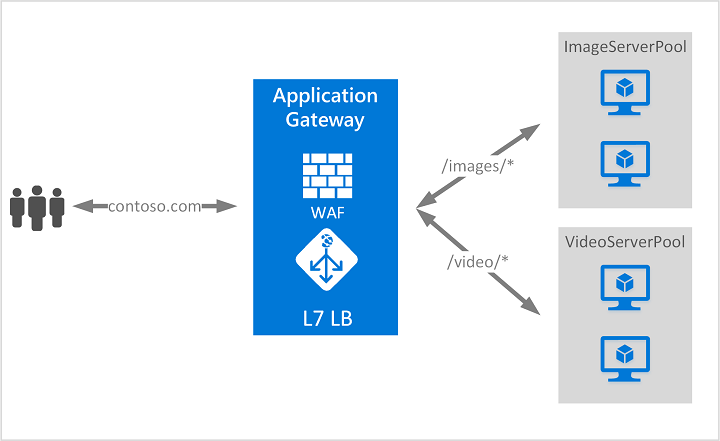
In fact, it is enough that the AZDO project <em>Build Service</em> has read permissions on the feed in order to be able to consume its packages.</p>]]></content><author><name>Fabio Cannas</name></author><category term="[&quot;Devops&quot;]" /><category term="dotnet" /><category term="CICD pipelines" /><category term="Development" /><category term=".NET" /><category term=".NET 8" /><category term="Nuget" /><category term="Devops" /><category term="Azure Devops" /><summary type="html"><![CDATA[For some time now, an issue has been identified in NuGet that affects developers using multiple NuGet package sources in .NET 8 projects, particularly when one or more sources require authentication. The issue manifests as authentication failures during dotnet restore operations.]]></summary></entry><entry><title type="html">Stopping Azure Application Gateway to save costs: a quick win for your Azure bill</title><link href="https://www.fabiocannas.com/2025/08/18/Stopping-Azure-Application-Gateway-to-Save-Costs.html/" rel="alternate" type="text/html" title="Stopping Azure Application Gateway to save costs: a quick win for your Azure bill" /><published>2025-08-18T00:00:00+00:00</published><updated>2025-08-18T00:00:00+00:00</updated><id>https://www.fabiocannas.com/2025/08/18/Stopping-Azure-Application-Gateway-to-Save-Costs</id><content type="html" xml:base="https://www.fabiocannas.com/2025/08/18/Stopping-Azure-Application-Gateway-to-Save-Costs.html/"><![CDATA[<p><img src="https://learn.microsoft.com/en-us/azure/application-gateway/media/application-gateway-url-route-overview/figure1-720.png" alt="Azure Application Gateway" /></p>

<p><em><a href="https://learn.microsoft.com/en-us/azure/application-gateway/overview">What is Azure Application Gateway?</a></em></p>

<p>Azure Application Gateway is a powerful load balancing service, but it can be as well one of those services that quietly accumulates costs even when you are not actively using it. If you are running development environments, proof-of-concepts, or seasonal applications, stopping your Application Gateway when it’s not needed can lead to significant cost savings.</p>

<h2 id="how-does-the-application-gateway-impact-on-azure-costs">How does the Application Gateway impact on Azure costs?</h2>
<p>Unlike some Azure services that only charge for usage, Application Gateway has a fixed hourly charge simply for being provisioned. Even if no traffic is flowing through it, you are still paying for the gateway to be available. For the Web Application Firewall V2 tier, this can be around €300 per month (as of August 18, 2025, for the Italy North region) just for having it running.</p>

<h2 id="how-to-stop-azure-application-gateway">How to Stop Azure Application Gateway</h2>
<blockquote>
  <p><strong>The Azure Application Gateway cannot be stopped from the Azure portal, you have to use az cli/Powershell or the <a href="https://learn.microsoft.com/en-us/rest/api/application-gateway/application-gateways/stop?view=rest-application-gateway-2024-05-01&amp;tabs=HTTP">REST API</a>.</strong></p>
</blockquote>

<blockquote>
  <p><strong>To stop/start an Azure Application Gateway you need to be assigned with the Contributor role.</strong></p>
</blockquote>

<h3 id="using-azure-cli">Using Azure CLI</h3>

<div class="language-bash highlighter-rouge"><div class="highlight"><pre class="highlight"><code>az network application-gateway stop <span class="nt">--ids</span> &lt;agw_id&gt;
</code></pre></div></div>

<p>or</p>

<div class="language-bash highlighter-rouge"><div class="highlight"><pre class="highlight"><code>az network application-gateway stop <span class="se">\</span>
  <span class="nt">--name</span> &lt;agw_name&gt; <span class="se">\</span>
  <span class="nt">--resource-group</span> &lt;rg_name&gt;
</code></pre></div></div>

<h3 id="using-powershell">Using PowerShell</h3>

<div class="language-bash highlighter-rouge"><div class="highlight"><pre class="highlight"><code><span class="nv">$AppGw</span> <span class="o">=</span> Get-AzApplicationGateway <span class="nt">-Name</span> &lt;agw_name&gt; <span class="nt">-ResourceGroupName</span> &lt;rg_name&gt;
Stop-AzApplicationGateway <span class="nt">-ApplicationGateway</span> <span class="nv">$AppGw</span>
</code></pre></div></div>

<h2 id="important-considerations">Important Considerations</h2>
<p>What happens when you stop the Azure Application Gateway:</p>
<ul>
  <li>All traffic routing through the gateway will be interrupted.</li>
  <li>All configurations are preserved, except for VIP, in V1 sku Azure Application Gateways only (for V2 sku, IPs are static).</li>
  <li>The DNS name associated with the Azure Application Gateway does not change.</li>
  <li><strong>PUT operations done on a stopped Azure Application Gateway will trigger a start.</strong></li>
</ul>

<p><img src="https://github.com/fabiocannas/fabiocannas.github.io/blob/main/_posts/2025-08-18-Stopping-Azure-Application-Gateway-to-Save-Costs/2025-08-18-Stopping-Azure-Application-Gateway-to-Save-Costs.png?raw=true" alt="plot" /></p>

<p><em>Check Azure Application Gateway operational state in “Properties” blade.</em></p>

<h2 id="restart-the-azure-application-gateway-when-you-need-it">Restart the Azure Application Gateway when you need it</h2>

<h3 id="using-azure-cli-1">Using Azure CLI</h3>

<div class="language-bash highlighter-rouge"><div class="highlight"><pre class="highlight"><code>az network application-gateway start <span class="nt">--ids</span> &lt;agw_id&gt;
</code></pre></div></div>

<p>or</p>

<div class="language-bash highlighter-rouge"><div class="highlight"><pre class="highlight"><code>az network application-gateway start <span class="se">\</span>
  <span class="nt">--name</span> &lt;agw_name&gt; <span class="se">\</span>
  <span class="nt">--resource-group</span> &lt;rg_name&gt;
</code></pre></div></div>

<h3 id="using-powershell-1">Using PowerShell</h3>

<div class="language-bash highlighter-rouge"><div class="highlight"><pre class="highlight"><code><span class="nv">$AppGw</span> <span class="o">=</span> Get-AzApplicationGateway <span class="nt">-Name</span> &lt;agw_name&gt; <span class="nt">-ResourceGroupName</span> &lt;rg_name&gt;
Start-AzApplicationGateway <span class="nt">-ApplicationGateway</span> <span class="nv">$AppGw</span>
</code></pre></div></div>

<p><strong>Note that it typically takes a few minutes for the Application Gateway to fully start and begin accepting traffic.</strong></p>

<p>For non-production environments or applications with predictable downtime, stopping Azure Application Gateway is one of the easiest ways to reduce Azure costs. The savings can be substantial, especially when multiplied across multiple environments or extended periods.</p>]]></content><author><name>Fabio Cannas</name></author><category term="[&quot;FinOps&quot;]" /><category term="Azure Application Gateway" /><category term="FinOps" /><summary type="html"><![CDATA[]]></summary></entry><entry><title type="html">App Service with Azure Files mount as local share, using private connectivity. Did you know?</title><link href="https://www.fabiocannas.com/2025/08/05/App_Service_Mount_Azure_Files_as_Local_Share_Using_Private_Connectivity.html/" rel="alternate" type="text/html" title="App Service with Azure Files mount as local share, using private connectivity. Did you know?" /><published>2025-08-05T00:00:00+00:00</published><updated>2025-08-05T00:00:00+00:00</updated><id>https://www.fabiocannas.com/2025/08/05/App_Service_Mount_Azure_Files_as_Local_Share_Using_Private_Connectivity</id><content type="html" xml:base="https://www.fabiocannas.com/2025/08/05/App_Service_Mount_Azure_Files_as_Local_Share_Using_Private_Connectivity.html/"><![CDATA[<h2 id="context">Context</h2>
<p>You are working on an Azure infrastructure that must implement private connectivity.
You create an App Service that needs a Azure Files mounted as local share.
Both App Service and Storage account use private connectivity only.</p>

<p><strong><a href="https://learn.microsoft.com/en-us/azure/app-service/overview-vnet-integration">App Service’s virtual network integration</a> is active, so the app can access resources in your virtual network.
Inbound private access to the app and to the storage account is granted through <a href="https://learn.microsoft.com/en-us/azure/private-link/private-endpoint-overview">private endpoints</a>.</strong></p>

<h2 id="the-problem">The Problem</h2>

<p>You already configured the fileshare mount on App Service, but the app is unable to read from the fileshare.</p>

<h2 id="why">Why?</h2>

<p><img src="https://media1.giphy.com/media/v1.Y2lkPTc5MGI3NjExdGlmb2gxMHRqZ2R4eGRiN2QxYTZucmRhNjZlaTlhZDZyMWV3cW05OSZlcD12MV9pbnRlcm5hbF9naWZfYnlfaWQmY3Q9Zw/WRQBXSCnEFJIuxktnw/giphy.gif" alt="Math lady meme" /></p>

<p>The reasons could be many, but one important thing to know is the following: 
<strong>with virtual network integration on your app, the mounted drive uses an RFC1918 IP address and not an IP address from your virtual network.
In order to enable routing through your virtual network you have to set the following app setting in App Service’s environment variables:</strong></p>

<h2 id="the-solution">The Solution</h2>

<div class="language-bash highlighter-rouge"><div class="highlight"><pre class="highlight"><code>WEBSITE_CONTENTOVERVNET <span class="o">=</span> 1
</code></pre></div></div>

<h2 id="sources">Sources</h2>

<ul>
  <li>
    <p><a href="https://learn.microsoft.com/en-us/azure/app-service/configure-vnet-integration-routing#content-share">Manage Azure App Service virtual network integration routing</a></p>
  </li>
  <li>
    <p><a href="https://learn.microsoft.com/en-us/azure/app-service/configure-connect-to-azure-storage?tabs=basic%2Cportal&amp;pivots=container-linux">Mount Azure Storage as a local share in App Service</a></p>
  </li>
</ul>]]></content><author><name>Fabio Cannas</name></author><category term="[&quot;Azure App Service&quot;, &quot;Networking&quot;]" /><category term="Azure App Service" /><category term="Web App" /><category term="Azure Storage Account" /><category term="Azure Files" /><category term="Private Link" /><category term="Private endpoint" /><category term="Networking" /><summary type="html"><![CDATA[Context You are working on an Azure infrastructure that must implement private connectivity. You create an App Service that needs a Azure Files mounted as local share. Both App Service and Storage account use private connectivity only.]]></summary></entry><entry><title type="html">How to Monitor and Cap Log Analytics Workspace Ingestion Across Your Azure Tenant</title><link href="https://www.fabiocannas.com/2025/07/31/How_to_Monitor_and_Cap_Log_Analytics_Workspace_Ingestion.html/" rel="alternate" type="text/html" title="How to Monitor and Cap Log Analytics Workspace Ingestion Across Your Azure Tenant" /><published>2025-07-31T00:00:00+00:00</published><updated>2025-07-31T00:00:00+00:00</updated><id>https://www.fabiocannas.com/2025/07/31/How_to_Monitor_and_Cap_Log_Analytics_Workspace_Ingestion</id><content type="html" xml:base="https://www.fabiocannas.com/2025/07/31/How_to_Monitor_and_Cap_Log_Analytics_Workspace_Ingestion.html/"><![CDATA[<p>The Azure Log Analytics Workspace is a powerful tool for collecting and analyzing telemetry data in Azure Monitor. 
However, uncontrolled data ingestion can lead to unexpected costs. In this post, we’ll explore how to use Azure Resource Graph (ARG) to identify Log Analytics Workspaces across your tenant and monitor their ingestion volume, helping you implement capping strategies to stay within budget.</p>

<h3 id="why-cap-log-analytics-workspace-ingestion">Why Cap Log Analytics Workspace Ingestion?</h3>
<p>Azure charges for Log Analytics Workspace based on the volume of data ingested. Without proper controls, ingestion can spike due to:</p>
<ul>
  <li>Excessive data from monitored resources</li>
  <li>Misconfigured diagnostic settings</li>
  <li>Unexpected changes in workloads</li>
</ul>

<p>Capping ingestion helps:</p>
<ul>
  <li>Prevent budget overruns</li>
  <li>Maintain predictable costs</li>
</ul>

<h3 id="how-to-identify-log-analytics-workspaces-using-azure-resource-graph">How to Identify Log Analytics Workspaces Using Azure Resource Graph</h3>
<p>Use an Azure Resource Graph query to list all Log Analytics Workspaces and check which of them has capping enabled:</p>

<div class="language-bash highlighter-rouge"><div class="highlight"><pre class="highlight"><code>Resources
| where <span class="nb">type</span> <span class="o">==</span> <span class="s2">"microsoft.operationalinsights/workspaces"</span>
| extend dailyQuotaGb <span class="o">=</span> properties.workspaceCapping.dailyQuotaGb
| project name, location, dailyQuotaGb, subscriptionId, <span class="nb">id</span>
</code></pre></div></div>

<blockquote>
  <p><strong>Note:</strong> records for which ‘dailyQuotaGb’ column has ‘-1’ value have no cap enabled!</p>
</blockquote>

<p>You can also create a Log Search Alert to audit Log Analytics Workspace periodically:</p>

<div class="language-bash highlighter-rouge"><div class="highlight"><pre class="highlight"><code>arg<span class="o">(</span><span class="s2">""</span><span class="o">)</span>.Resources
| where <span class="nb">type</span> <span class="o">==</span> <span class="s2">"microsoft.operationalinsights/workspaces"</span>
| extend dailyQuotaGb <span class="o">=</span> properties.workspaceCapping.dailyQuotaGb
| project name, location, dailyQuotaGb, subscriptionId, <span class="nb">id</span>
</code></pre></div></div>

<p>To know  more about Azure Monitor Alerts with ARG queries see <a href="https://learn.microsoft.com/en-us/azure/governance/resource-graph/alerts-query-quickstart?tabs=azure-resource-graph">Azure Resource Graph Alerts query quickstart</a></p>

<h3 id="how-to-set-daily-cap-in-log-analytics-workspace">How To Set Daily Cap in Log Analytics Workspace</h3>
<p>In the Azure Portal, go to your instance of Log Analytics Workspace:</p>
<ul>
  <li>From the left menu, select <strong>Usage and estimated costs</strong>.</li>
  <li>Select <strong>Daily Cap</strong>.</li>
  <li>Select <strong>ON</strong> and set the cap in <strong>GB/day</strong> (the minimum value is 0.023).</li>
</ul>

<p><img src="https://github.com/fabiocannas/fabiocannas.github.io/blob/main/_posts/2025-07-31-How_to_Monitor_and_Cap_Log_Analytics_Workspace_Ingestion/2025-07-31-How_to_Monitor_and_Cap_Log_Analytics_Workspace_Ingestion.png?raw=true" alt="plot" /></p>

<p>If you prefer to use Azure Resource Manager APIs, here is the link to Log Analytics Workspace’s <strong>Create Or Update</strong> documentation:
<a href="https://learn.microsoft.com/en-us/rest/api/loganalytics/workspaces/create-or-update?view=rest-loganalytics-2025-02-01">Azure Resource Manager - Workspaces - Create Or Update</a></p>

<h3 id="monitor-ingestion-volume-using-log-analytics-queries">Monitor Ingestion Volume Using Log Analytics queries</h3>
<p>Create a Log Search Alert To track ingestion volume, by querying the <strong>Usage</strong> table:</p>
<div class="language-bash highlighter-rouge"><div class="highlight"><pre class="highlight"><code>Usage
| where IsBillable
| summarize DataGB <span class="o">=</span> <span class="nb">sum</span><span class="o">(</span>Quantity / 1000<span class="o">)</span>
| where DataGB <span class="o">&gt;</span> 1
</code></pre></div></div>

<p>You can also create a Log Search Alert to notify you when ingestion exceeds a defined limit:</p>
<div class="language-bash highlighter-rouge"><div class="highlight"><pre class="highlight"><code>_LogOperation | where Category <span class="o">=</span>~ <span class="s2">"Ingestion"</span> | where Detail contains <span class="s2">"OverQuota"</span>
</code></pre></div></div>

<p>Alerts can be configured to run daily and trigger actions like emails or automation.</p>

<p>Capping Log Analytics Workspace ingestion is essential for cost control in Azure Monitor. By combining Azure Resource Graph for discovery and Log Analytics queries for monitoring, you can build a proactive strategy to manage ingestion across your tenant.</p>]]></content><author><name>Fabio Cannas</name></author><category term="[&quot;FinOps&quot;]" /><category term="Log Analytics Workspace" /><category term="FinOps" /><summary type="html"><![CDATA[The Azure Log Analytics Workspace is a powerful tool for collecting and analyzing telemetry data in Azure Monitor. However, uncontrolled data ingestion can lead to unexpected costs. In this post, we’ll explore how to use Azure Resource Graph (ARG) to identify Log Analytics Workspaces across your tenant and monitor their ingestion volume, helping you implement capping strategies to stay within budget.]]></summary></entry><entry><title type="html">The Azure Developer’s Superpower: azd CLI</title><link href="https://www.fabiocannas.com/2025/07/27/The_Azure_Developers_Superpower_azd_CLI.html/" rel="alternate" type="text/html" title="The Azure Developer’s Superpower: azd CLI" /><published>2025-07-27T00:00:00+00:00</published><updated>2025-07-27T00:00:00+00:00</updated><id>https://www.fabiocannas.com/2025/07/27/The_Azure_Developers_Superpower_azd_CLI</id><content type="html" xml:base="https://www.fabiocannas.com/2025/07/27/The_Azure_Developers_Superpower_azd_CLI.html/"><![CDATA[<p>After a somewhat lengthy pause, it was time to update my blog.</p>

<p>Following is the content of my session at the Azure Meetup Casteddu, held a few days ago at Sa Manifattura, Cagliari.</p>

<p><img src="https://github.com/fabiocannas/fabiocannas.github.io/blob/main/_posts/2025-07-27-The_Azure_Developers_Superpower_azd_CLI/2025-07-27-The_Azure_Developers_Superpower_azd_CLI_intro_slide.jpg?raw=true" alt="plot" /></p>

<p>To stay updated about Azure Meetup Casteddu events, I invite you to join the community:</p>

<p><a href="https://chat.whatsapp.com/E1m2qrQ4V8E15OLgGAkWFg=">Join Azure Meetup Casteddu on Whatsapp</a></p>

<p><a href="https://www.meetup.com/it-IT/azure-meetup-casteddu/">Join Azure Meetup Casteddu - Meetup page</a></p>

<p><a href="https://www.linkedin.com/company/azure-meetup-casteddu/posts/?feedView=all">Follow Azure Meetup Casteddu on LinkedIn</a></p>

<h1 id="azure-developer-cli-azd">Azure Developer CLI (azd)</h1>

<h2 id="the-common-azure-development-challenges">The common Azure Development Challenges</h2>
<p>Have you ever spent more time configuring Azure deployments than actually writing code?</p>

<p>Well, it happened to me, specially when I was learning Azure.</p>

<p>Before diving into this article, try to answer the following questions:</p>

<ol>
  <li>How long does it take you to build a proof of concept?</li>
  <li>How long does it take you to deploy it on Azure?</li>
  <li>Can you do it yourself or do you ask your DevOps mates for help?</li>
  <li>Are you able to implement a robust repeatable deployment process that allows you to share your work with your colleagues so they can work on it and redeploy it in a short time? How long does it take you?</li>
</ol>

<h2 id="the-problems-we-all-face">The Problems We All Face</h2>

<ul>
  <li>Infrastructure Setup Complexity: Deep knowledge of Azure services is required;</li>
  <li>Time spent on DevOps/Platform engineering instead of development;</li>
  <li>Deployment pipeline + IAC headaches;</li>
  <li>Environment consistency issues.</li>
</ul>

<p>All of these are factors that can slow down development and increase the risk of errors.</p>

<h2 id="the-solution-azure-developer-cli">The Solution: Azure Developer CLI</h2>
<p>An open-source tool that accelerates provisioning and deploying app resources on Azure.
azd CLI provides best practice, developer-friendly commands that map to key stages in development workflows.</p>

<blockquote>
  <p><strong>Note:</strong> Azure Developer CLI ≠ Azure CLI</p>
</blockquote>

<table>
  <thead>
    <tr>
      <th>Tool</th>
      <th>Sample Command</th>
      <th>Outcome</th>
    </tr>
  </thead>
  <tbody>
    <tr>
      <td>Azure Developer CLI</td>
      <td><code class="language-plaintext highlighter-rouge">azd provision</code></td>
      <td>Provisions multiple Azure resources required for an app based on project resources and configurations, such as an Azure resource group, an Azure App Service web app and app service plan, an Azure Storage account, and an Azure Key Vault.</td>
    </tr>
    <tr>
      <td>Azure CLI</td>
      <td><code class="language-plaintext highlighter-rouge">az webapp create --resource-group myResourceGroup --plan myAppServicePlan --name myWebApp</code></td>
      <td>Provisions a new web app in the specified resource group and app service plan.</td>
    </tr>
    <tr>
      <td>Azure PowerShell</td>
      <td><code class="language-plaintext highlighter-rouge">New-AzWebApp -ResourceGroupName "myResourceGroup" -Name "myWebApp" -AppServicePlan "myAppServicePlan"</code></td>
      <td>Provisions a new web app in the specified resource group and app service plan.</td>
    </tr>
  </tbody>
</table>

<p><a href="https://learn.microsoft.com/en-us/azure/developer/azure-developer-cli/azd-commands?WT.mc_id=AZ-MVP-5004796#compare-azure-developer-cli-commands">source - aka.ms/learn - Compare Azure Developer CLI commands</a></p>

<h2 id="features">Features</h2>

<h3 id="supported-azure-compute-services-host">Supported Azure compute services (host)</h3>

<table>
  <thead>
    <tr>
      <th>Azure compute service</th>
      <th>Feature Stage</th>
    </tr>
  </thead>
  <tbody>
    <tr>
      <td>Azure App Service</td>
      <td>Stable</td>
    </tr>
    <tr>
      <td>Azure Static Web Apps</td>
      <td>Stable</td>
    </tr>
    <tr>
      <td>Azure Container Apps</td>
      <td>Beta</td>
    </tr>
    <tr>
      <td>Azure Functions</td>
      <td>Stable</td>
    </tr>
    <tr>
      <td>Azure Kubernetes Service</td>
      <td>Beta (only for projects deployable via <code class="language-plaintext highlighter-rouge">kubectl apply -f</code>)</td>
    </tr>
    <tr>
      <td>Azure Spring Apps</td>
      <td>Beta</td>
    </tr>
  </tbody>
</table>

<p><a href="https://learn.microsoft.com/en-us/azure/developer/azure-developer-cli/supported-languages-environments#supported-azure-compute-services-host">source - aka.ms/learn - azd CLI Supported Azure Compute Services</a></p>

<h3 id="supported-languages-and-frameworks">Supported languages and frameworks</h3>

<table>
  <thead>
    <tr>
      <th>Language</th>
      <th>Feature Stage</th>
    </tr>
  </thead>
  <tbody>
    <tr>
      <td>Node.js</td>
      <td>Stable</td>
    </tr>
    <tr>
      <td>Python</td>
      <td>Stable</td>
    </tr>
    <tr>
      <td>.NET</td>
      <td>Stable</td>
    </tr>
    <tr>
      <td>Java</td>
      <td>Stable</td>
    </tr>
  </tbody>
</table>

<p><a href="https://learn.microsoft.com/en-us/azure/developer/azure-developer-cli/supported-languages-environments#supported-languages-and-framework">source - aka.ms/learn - azd CLI Supported Languages and Framework</a></p>

<h3 id="template-library---awesome-azd">Template library - <a href="aka.ms/awesome-azd">AWESOME-AZD</a></h3>
<p><img src="https://github.com/fabiocannas/fabiocannas.github.io/blob/main/_posts/2025-07-27-The_Azure_Developers_Superpower_azd_CLI/2025-07-27-The_Azure_Developers_Superpower_azd_CLI_azd_awesome.jpg?raw=true" alt="plot" /></p>

<h3 id="develop-your-own-templates">Develop your own templates</h3>
<p><img src="https://github.com/fabiocannas/fabiocannas.github.io/blob/main/_posts/2025-07-27-The_Azure_Developers_Superpower_azd_CLI/2025-07-27-The_Azure_Developers_Superpower_azd_CLI_custom_templates.jpg?raw=true" alt="plot" /></p>

<p><a href="https://learn.microsoft.com/en-us/azure/developer/azure-developer-cli/make-azd-compatible">source - aka.ms/learn - Make azd Compatible</a></p>

<h2 id="template-structure">Template Structure</h2>
<ul>
  <li><code class="language-plaintext highlighter-rouge">.azure</code> folder - Contains essential Azure configurations and environment variables, such as the location to deploy resources or other subscription information</li>
  <li><code class="language-plaintext highlighter-rouge">infra</code> folder - Contains all of the Bicep or Terraform infrastructure-as-code files for the azd template</li>
  <li><code class="language-plaintext highlighter-rouge">src</code> folder - Contains all of the deployable app source code</li>
  <li><code class="language-plaintext highlighter-rouge">azure.yaml</code> file - A configuration file that defines services and maps them to Azure resources</li>
</ul>

<h3 id="azureyaml-overview">Azure.yaml Overview</h3>
<p>The azure.yaml file describes the application and the Azure resources included in the azd template.</p>

<div class="language-yaml highlighter-rouge"><div class="highlight"><pre class="highlight"><code><span class="c1"># yaml-language-server: $schema=https://raw.githubusercontent.com/Azure/azure-dev/main/schemas/v1.0/azure.yaml.json</span>

<span class="na">name</span><span class="pi">:</span> <span class="s">todo-csharp-sql</span>
<span class="na">metadata</span><span class="pi">:</span>
  <span class="na">template</span><span class="pi">:</span> <span class="s">todo-csharp-sql@0.0.1-beta</span>
<span class="na">workflows</span><span class="pi">:</span>
  <span class="na">up</span><span class="pi">:</span> 
    <span class="na">steps</span><span class="pi">:</span>
      <span class="pi">-</span> <span class="na">azd</span><span class="pi">:</span> <span class="s">provision</span>
      <span class="pi">-</span> <span class="na">azd</span><span class="pi">:</span> <span class="s">deploy --all</span>
<span class="na">services</span><span class="pi">:</span>
  <span class="na">web</span><span class="pi">:</span>
    <span class="na">project</span><span class="pi">:</span> <span class="s">./src/web</span>
    <span class="na">dist</span><span class="pi">:</span> <span class="s">dist</span>
    <span class="na">language</span><span class="pi">:</span> <span class="s">js</span>
    <span class="na">host</span><span class="pi">:</span> <span class="s">appservice</span>
    <span class="na">hooks</span><span class="pi">:</span>
      <span class="c1"># Creates a temporary `.env.local` file for the build command. Vite will automatically use it during build.</span>
      <span class="c1"># The expected/required values are mapped to the infrastructure outputs.</span>
      <span class="c1"># .env.local is ignored by git, so it will not be committed if, for any reason, if deployment fails.</span>
      <span class="c1"># see: https://vitejs.dev/guide/env-and-mode</span>
      <span class="c1"># Note: Notice that dotenv must be a project dependency for this to work. See package.json.</span>
      <span class="na">prepackage</span><span class="pi">:</span>
        <span class="na">windows</span><span class="pi">:</span>
          <span class="na">shell</span><span class="pi">:</span> <span class="s">pwsh</span>
          <span class="na">run</span><span class="pi">:</span> <span class="s1">'</span><span class="s">echo</span><span class="nv"> </span><span class="s">"VITE_API_BASE_URL=""$env:API_BASE_URL"""</span><span class="nv"> </span><span class="s">&gt;</span><span class="nv"> </span><span class="s">.env.local</span><span class="nv"> </span><span class="s">;</span><span class="nv"> </span><span class="s">echo</span><span class="nv"> </span><span class="s">"VITE_APPLICATIONINSIGHTS_CONNECTION_STRING=""$env:APPLICATIONINSIGHTS_CONNECTION_STRING"""</span><span class="nv"> </span><span class="s">&gt;&gt;</span><span class="nv"> </span><span class="s">.env.local'</span>
        <span class="na">posix</span><span class="pi">:</span>
          <span class="na">shell</span><span class="pi">:</span> <span class="s">sh</span>
          <span class="na">run</span><span class="pi">:</span> <span class="s1">'</span><span class="s">echo</span><span class="nv"> </span><span class="s">VITE_API_BASE_URL=\"$API_BASE_URL\"</span><span class="nv"> </span><span class="s">&gt;</span><span class="nv"> </span><span class="s">.env.local</span><span class="nv"> </span><span class="s">&amp;&amp;</span><span class="nv"> </span><span class="s">echo</span><span class="nv"> </span><span class="s">VITE_APPLICATIONINSIGHTS_CONNECTION_STRING=\"$APPLICATIONINSIGHTS_CONNECTION_STRING\"</span><span class="nv"> </span><span class="s">&gt;&gt;</span><span class="nv"> </span><span class="s">.env.local'</span>    
      <span class="na">postdeploy</span><span class="pi">:</span>
        <span class="na">windows</span><span class="pi">:</span>
          <span class="na">shell</span><span class="pi">:</span> <span class="s">pwsh</span>
          <span class="na">run</span><span class="pi">:</span> <span class="s1">'</span><span class="s">rm</span><span class="nv"> </span><span class="s">.env.local'</span>
        <span class="na">posix</span><span class="pi">:</span>
          <span class="na">shell</span><span class="pi">:</span> <span class="s">sh</span>
          <span class="na">run</span><span class="pi">:</span> <span class="s1">'</span><span class="s">rm</span><span class="nv"> </span><span class="s">.env.local'</span>
  <span class="na">api</span><span class="pi">:</span>
    <span class="na">project</span><span class="pi">:</span> <span class="s">./src/api</span>
    <span class="na">language</span><span class="pi">:</span> <span class="s">csharp</span>
    <span class="na">host</span><span class="pi">:</span> <span class="s">appservice</span>
</code></pre></div></div>

<p>As you can see from the <a href="https://github.com/Azure-Samples/todo-csharp-sql">todo-csharp-sql</a> template’s azure.yaml, the template includes two services:</p>

<table>
  <thead>
    <tr>
      <th>App</th>
      <th>Azure resource</th>
      <th>Service implementation language</th>
    </tr>
  </thead>
  <tbody>
    <tr>
      <td>web</td>
      <td>App Service</td>
      <td>JS</td>
    </tr>
    <tr>
      <td>api</td>
      <td>App Service</td>
      <td>C#</td>
    </tr>
  </tbody>
</table>

<h3 id="how-azd-maps-iac-templates-and-application-source-code-to-service-in-azureyaml">How azd Maps IaC templates and application source code to service in azure.yaml</h3>
<p>For what concerns IaC templates, the CLI assumes the IaC module name is the same as the service name, otherwise the module path (relative to the root infra folder) can be specified using the <em>module</em> property at the single service level.</p>

<p>The path to the service source code is specified through the service <em>project</em> property.</p>

<p>For further information, here is the link to <a href="https://learn.microsoft.com/en-us/azure/developer/azure-developer-cli/azd-schema" target="_blank">azure.yaml schema</a>.</p>

<h2 id="workflows">Workflows</h2>

<h3 id="azd-init-workflows">azd init workflows</h3>
<ol>
  <li>Scan current directory: Analyzes existing app codebase to generate appropriate configuration</li>
  <li>Select a template: Clones and initializes a template from gallery</li>
  <li>Create a minimal project: Initializes basic azure.yaml file</li>
</ol>

<h3 id="azd-up-workflow">azd up workflow</h3>
<ol>
  <li>Packaging: prepares the application code and dependencies</li>
  <li>Provisioning: creates and configures Azure resources</li>
  <li>Deployment: deploys the packaged application</li>
</ol>

<h2 id="azd-cli-zero-to-hero-in-8-commands">azd CLI Zero to Hero in 8 Commands</h2>

<div class="language-bash highlighter-rouge"><div class="highlight"><pre class="highlight"><code><span class="c"># 1. Login to Azure</span>
azd auth login

<span class="c"># 2. Initialize from template</span>
azd init <span class="nt">--template</span> todo-csharp-sql

<span class="c"># 3. Provision and deploy</span>
azd up

<span class="c"># 4. View your live app</span>
azd show

<span class="c"># 5. Provision infrastructure (Bicep/Terraform)</span>
azd provision

<span class="c"># 6. Make changes to app code and redeploy</span>
azd deploy

<span class="c"># 7. Monitor and troubleshoot</span>
azd monitor

<span class="c"># 8. Delete resources</span>
azd down
</code></pre></div></div>

<p>Below you will see the commands in action:</p>

<h3 id="azd-auth-login">azd auth login</h3>
<p>Let’s authenticate to Azure:
<img src="https://github.com/fabiocannas/fabiocannas.github.io/blob/main/_posts/2025-07-27-The_Azure_Developers_Superpower_azd_CLI/2025-07-27-The_Azure_Developers_Superpower_azd_CLI_azd_auth_login.jpg?raw=true" alt="plot" /></p>

<h3 id="azd-init">azd init</h3>
<p>Let’s download a template and then initialize the workspace:
<img src="https://github.com/fabiocannas/fabiocannas.github.io/blob/main/_posts/2025-07-27-The_Azure_Developers_Superpower_azd_CLI/2025-07-27-The_Azure_Developers_Superpower_azd_CLI_azd_init.jpg?raw=true" alt="plot" /></p>

<p>Let’s take a look to the .azure folder:
<img src="https://github.com/fabiocannas/fabiocannas.github.io/blob/main/_posts/2025-07-27-The_Azure_Developers_Superpower_azd_CLI/2025-07-27-The_Azure_Developers_Superpower_azd_CLI_azd_init_dotazure_folder.jpg?raw=true" alt="plot" /></p>

<p>As I wrote before, this folder contains the environment configuration. 
In this case, only one environment has been created, “demo”, but multiple environments can be created.</p>

<h3 id="azd-up">azd up</h3>
<p>This is my favorite command. Hold on tight!
<img src="https://github.com/fabiocannas/fabiocannas.github.io/blob/main/_posts/2025-07-27-The_Azure_Developers_Superpower_azd_CLI/2025-07-27-The_Azure_Developers_Superpower_azd_CLI_azd_up_1.jpg?raw=true" alt="plot" /></p>

<p><img src="https://github.com/fabiocannas/fabiocannas.github.io/blob/main/_posts/2025-07-27-The_Azure_Developers_Superpower_azd_CLI/2025-07-27-The_Azure_Developers_Superpower_azd_CLI_azd_up_2.jpg?raw=true" alt="plot" /></p>

<blockquote>
  <p>With a single command we created the infrastructure and deployed the applications.</p>
</blockquote>

<h3 id="azd-show">azd show</h3>
<p>Let’s have a look at the apps that we just published:
<img src="https://github.com/fabiocannas/fabiocannas.github.io/blob/main/_posts/2025-07-27-The_Azure_Developers_Superpower_azd_CLI/2025-07-27-The_Azure_Developers_Superpower_azd_CLI_azd_show.jpg?raw=true" alt="plot" /></p>

<h3 id="azd-deploy">azd deploy</h3>
<p>Let’s publish changes to the webapp:
<img src="https://github.com/fabiocannas/fabiocannas.github.io/blob/main/_posts/2025-07-27-The_Azure_Developers_Superpower_azd_CLI/2025-07-27-The_Azure_Developers_Superpower_azd_CLI_azd_deploy.jpg?raw=true" alt="plot" /></p>

<h3 id="azd-monitor">azd monitor</h3>
<p>Finally, we can monitor our application: 
<img src="https://github.com/fabiocannas/fabiocannas.github.io/blob/main/_posts/2025-07-27-The_Azure_Developers_Superpower_azd_CLI/2025-07-27-The_Azure_Developers_Superpower_azd_CLI_azd_monitor.jpg?raw=true" alt="plot" /></p>

<p><img src="https://github.com/fabiocannas/fabiocannas.github.io/blob/main/_posts/2025-07-27-The_Azure_Developers_Superpower_azd_CLI/2025-07-27-The_Azure_Developers_Superpower_azd_CLI_azd_monitor_az_portal_dashboard.jpg?raw=true" alt="plot" /></p>

<p><code class="language-plaintext highlighter-rouge">TIP: run the following command to go to Application Insights Live Metrics</code></p>

<div class="language-bash highlighter-rouge"><div class="highlight"><pre class="highlight"><code>azd monitor <span class="nt">--live</span>
</code></pre></div></div>

<h3 id="azd-down">azd down</h3>
<p>Here is how to cleanup Azure resources: 
<img src="https://github.com/fabiocannas/fabiocannas.github.io/blob/main/_posts/2025-07-27-The_Azure_Developers_Superpower_azd_CLI/2025-07-27-The_Azure_Developers_Superpower_azd_CLI_azd_down.jpg?raw=true" alt="plot" /></p>

<h2 id="cicd-pipeline-support">CI/CD Pipeline Support</h2>

<h3 id="pipeline-configuration">Pipeline Configuration</h3>
<p>The <code class="language-plaintext highlighter-rouge">azd pipeline config</code> command automates provisioning and deployment of CI/CD pipelines using pipeline definition files included in azd templates.</p>

<p>Supports:</p>
<ul>
  <li>Azure Pipelines</li>
  <li>Github Actions</li>
</ul>

<h3 id="configuration-steps">Configuration Steps</h3>
<ol>
  <li>Authentication with Azure</li>
  <li>CI/CD platform selection</li>
  <li>Repository configuration</li>
  <li>Setup of the service principal</li>
  <li>Setup of the authentication:
    <ul>
      <li>GitHub: OpenID Connect (OIDC) or client credentials</li>
      <li>Azure Pipelines: Workload identity federation (OIDC) or client credentials</li>
    </ul>
  </li>
  <li>Provisioning of the pipeline files</li>
  <li>Creation of pipeline variables and secrets</li>
  <li>Commit and push changes</li>
  <li>Trigger pipeline runs</li>
</ol>

<h3 id="azd-pipeline-config-demo">azd pipeline config demo</h3>
<p>Let’s see the command in action:</p>

<p><img src="/assets/images/2025-07-27-The_Azure_Developers_Superpower_azd_CLI/2025-07-27-The_Azure_Developers_Superpower_azd_pipeline_config_1.jpg" alt="2025-07-27-The_Azure_Developers_Superpower_azd_pipeline_config_1" /></p>

<p><img src="/assets/images/2025-07-27-The_Azure_Developers_Superpower_azd_CLI/2025-07-27-The_Azure_Developers_Superpower_azd_pipeline_config_2.jpg" alt="2025-07-27-The_Azure_Developers_Superpower_azd_pipeline_config_2" /></p>

<blockquote>
  <p>Note: As you can see from the first screenshot, I chose Azure Devops provider, so i used a <a href="https://learn.microsoft.com/en-us/azure/devops/organizations/accounts/use-personal-access-tokens-to-authenticate?view=azure-devops&amp;tabs=Windows">PAT</a>.
The PAT must have the following scopes:</p>
  <ul>
    <li>Agent Pools (read, manage)</li>
    <li>Build (read and execute)</li>
    <li>Code (full)</li>
    <li>Project and team (read, write, and manage)</li>
    <li>Release (read, write, execute, and manage)</li>
    <li>Service Connections (read, query, and manage)</li>
  </ul>
</blockquote>

<p>Behind the scenes, azd cli created:</p>
<ul>
  <li>a new Azure Devops Project;</li>
  <li>a GIT repository for the project;</li>
  <li>an Azure resource group</li>
  <li>a managed identity on Azure, using Workload Identity Federation;</li>
  <li>a service connection (with workload identity federation) on Azure Devops, using the managed identity created previously;</li>
  <li>the CI/CD pipeline using the provided pipeline definition (azd-dev.yaml);</li>
  <li>pipeline variables and secrets. <em>IMPORTANT: secrets are stored in Azure Key vault</em>;</li>
  <li>Key vault read access role assignment for the managed identity, so it can retrieve secrets during pipeline execution.</li>
</ul>

<p>Impressive, right? :)</p>

<p>It would have taken me longer to do the same things without azd cli.</p>

<h2 id="event-hooks">Event Hooks</h2>
<p>Hooks can execute custom scripts before and after azd commands or service lifecycle events.
They are configured in azure.yaml file with OS-specific support (Windows or Posix).</p>

<h3 id="command-hooks">Command Hooks</h3>
<ul>
  <li>prerestore and postrestore</li>
  <li>preprovision and postprovision</li>
  <li>predeploy and postdeploy</li>
  <li>preup and postup</li>
  <li>predown and postdown</li>
</ul>

<h3 id="service-lifecycle-hooks">Service Lifecycle Hooks</h3>
<ul>
  <li>prerestore and postrestore</li>
  <li>prebuild and postbuild</li>
  <li>prepackage and postpackage</li>
  <li>predeploy and postdeploy</li>
</ul>

<h2 id="azd-compose-alpha">azd compose (alpha)</h2>

<div class="language-bash highlighter-rouge"><div class="highlight"><pre class="highlight"><code>azd config <span class="nb">set </span>alpha.compose on
</code></pre></div></div>

<p>I find this command very useful, even though the set of available resources is still limited, because I can create projects from scratch and have a well-set up IAC starter template, in a short time.</p>

<h3 id="azd-add">azd add</h3>
<p><code class="language-plaintext highlighter-rouge">azd add</code> command creates resources without manual IAC templates.
Infrastructure state is tracked in-memory.
<img src="/assets/images/2025-07-27-The_Azure_Developers_Superpower_azd_CLI/2025-07-27-The_Azure_Developers_Superpower_azd_compose_1.jpg" alt="2025-07-27-The_Azure_Developers_Superpower_azd_compose_1" /></p>

<p><img src="/assets/images/2025-07-27-The_Azure_Developers_Superpower_azd_CLI/2025-07-27-The_Azure_Developers_Superpower_azd_compose_2.jpg" alt="2025-07-27-The_Azure_Developers_Superpower_azd_compose_2" /></p>

<h3 id="azd-infra-gen">azd infra gen</h3>
<p><code class="language-plaintext highlighter-rouge">azd infra gen</code> or <code class="language-plaintext highlighter-rouge">azd infra synth</code> converts state to Bicep files.</p>

<p><img src="/assets/images/2025-07-27-The_Azure_Developers_Superpower_azd_CLI/2025-07-27-The_Azure_Developers_Superpower_azd_compose_3.jpg" alt="2025-07-27-The_Azure_Developers_Superpower_azd_compose_3.jpg" /></p>

<h2 id="azd-cli-extensions-alpha">azd CLI Extensions (alpha)</h2>

<div class="language-bash highlighter-rouge"><div class="highlight"><pre class="highlight"><code>azd config <span class="nb">set </span>alpha.extensions on
</code></pre></div></div>

<p>The extensions are modular components that extend azd CLI functionality.</p>

<h3 id="extension-sources">Extension Sources</h3>
<p>Extensions are distributed and managed through extension sources (an equivalent concept to NuGet or NPM feeds):</p>
<ul>
  <li>Official registry: https://aka.ms/azd/extensions/registry</li>
  <li>Development registry: https://aka.ms/azd/extensions/registry/dev</li>
</ul>

<p>Extension sources are manifest files providing lists of available extensions, following <a href="https://github.com/Azure/azure-dev/blob/main/cli/azd/extensions/registry.schema.json">the official schema</a>.</p>

<h2 id="get-started-with-azd-cli">Get Started with azd CLI</h2>

<h3 id="install-azd-cli">Install azd CLI</h3>

<div class="language-bash highlighter-rouge"><div class="highlight"><pre class="highlight"><code><span class="c"># Windows </span>
winget <span class="nb">install </span>microsoft.azd 

<span class="c"># macOS </span>
brew tap azure/azd <span class="o">&amp;&amp;</span> brew <span class="nb">install </span>azd 

<span class="c"># Linux </span>
curl <span class="nt">-fsSL</span> https://aka.ms/install-azd.sh | bash
</code></pre></div></div>

<h3 id="try-it-out">Try It Out</h3>
<div class="language-bash highlighter-rouge"><div class="highlight"><pre class="highlight"><code>azd auth login

azd init <span class="nt">--template</span> todo-csharp-sql

azd up
</code></pre></div></div>

<h2 id="resources">Resources</h2>
<h3 id="documentation-akamsazd">Documentation: <a href="aka.ms/azd">aka.ms/azd</a></h3>

<h3 id="templates-akamsawesome-azd">Templates: <a href="aka.ms/awesome-azd">aka.ms/awesome-azd</a></h3>

<h3 id="blog-azure-sdk-blog">Blog: <a href="https://devblogs.microsoft.com/azure-sdk/tag/azure-developer-cli/">Azure SDK Blog</a></h3>

<h3 id="see-you-at-the-next-azure-meetup-casteddu-events">See you at the next Azure Meetup Casteddu events!</h3>

<p><a href="https://chat.whatsapp.com/E1m2qrQ4V8E15OLgGAkWFg=">Join Azure Meetup Casteddu on Whatsapp</a></p>

<p><a href="https://www.meetup.com/it-IT/azure-meetup-casteddu/">Join Azure Meetup Casteddu - Meetup page</a></p>

<p><a href="https://www.linkedin.com/company/azure-meetup-casteddu/posts/?feedView=all">Follow Azure Meetup Casteddu on LinkedIn</a></p>]]></content><author><name>Fabio Cannas</name></author><category term="[&quot;.NET Development&quot;, &quot;Azure SDK&quot;, &quot;Community&quot;, &quot;Azure Meetup Casteddu&quot;]" /><category term="azd CLI" /><category term="Azure SDK" /><category term=".NET Development" /><category term="Meetup" /><category term="Azure Meetup Casteddu" /><category term="Speech" /><category term="Session" /><category term="Community" /><summary type="html"><![CDATA[After a somewhat lengthy pause, it was time to update my blog.]]></summary></entry></feed>